Real-world use case
Industry: Vendors
Who this is for
The problem
Used by Beauty, Home Services, Trades, Automotive, and Professional Services. The client picks a time based on your hours and staff availability.
How to configure it in Tuvy
- Used by Beauty, Home Services, Trades, Automotive, and Professional Services. The client picks a time based on your hours and staff availability.
The result
Used by Beauty, Home Services, Trades, Automotive, and Professional Services. The client picks a time based on your hours and staff availability.
Key technical features
- 1
Used by Beauty, Home Services, Trades, Automotive, and Professional Services. The client picks a time based on your hours and staff availability.
Real-world use case
Industry: Vendors
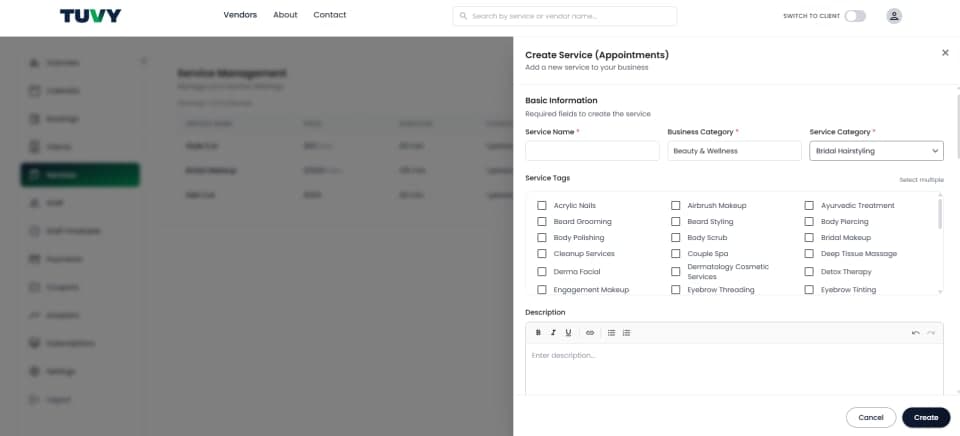
enter a clear name, for example Haircut & Styling.
The problem
Service Name: enter a clear name, for example Haircut & Styling.
How to configure it in Tuvy
- Service Name: enter a clear name, for example Haircut & Styling.
- Business Category: select the main industry, for example Beauty & Wellness.
- Category: select the sub-type, for example Salon Services.
- Search Keywords: tick the boxes for this service, for example Bridal Hairstyling. Clients search those words.
- Description: write what is included.
- Notes: add staff notes or booking instructions.
The result
Notes: add staff notes or booking instructions.
Key technical features
- 1
Service Name
enter a clear name, for example Haircut & Styling.
- 2
Business Category
select the main industry, for example Beauty & Wellness.
- 3
Category
select the sub-type, for example Salon Services.
- 4
Search Keywords
tick the boxes for this service, for example Bridal Hairstyling. Clients search those words.
- 5
Description
write what is included.
- 6
Notes
add staff notes or booking instructions.
Real-world use case
Industry: Vendors
Step 2 — Pricing and duration
The problem
Price Type: Fixed. Amount is the base price, for example $40. Variants change the public price to From $40.
How to configure it in Tuvy
- Price Type: Fixed. Amount is the base price, for example $40. Variants change the public price to From $40.
- Duration: how long the standard service takes, for example 60 minutes.
- Buffer Time: cleanup between clients. 15 minutes means a 10:00 finish does not open the next slot until 10:15.
- Variants: the client must pick one. Example: Hair Color $40 (1h), Tapered Hair Cut $120 (1h).
- Add-ons: optional extras. Example: Hair Wash $10, 10 minutes.
- Extra Time: more time without an extra charge.
- Pro Tip: Mobile cleaners: use buffer time for travel. Therapists: try 50 min session + 10 min buffer.
The result
Pro Tip: Mobile cleaners: use buffer time for travel. Therapists: try 50 min session + 10 min buffer.
Key technical features
- 1
Price Type
Fixed. Amount is the base price, for example $40. Variants change the public price to From $40.
- 2
Duration
how long the standard service takes, for example 60 minutes.
- 3
Buffer Time
cleanup between clients. 15 minutes means a 10:00 finish does not open the next slot until 10:15.
- 4
Variants
the client must pick one. Example: Hair Color $40 (1h), Tapered Hair Cut $120 (1h).
- 5
Add-ons
optional extras. Example: Hair Wash $10, 10 minutes.
- 6
Extra Time
more time without an extra charge.
- 7
Pro Tip
Mobile cleaners: use buffer time for travel. Therapists: try 50 min session + 10 min buffer.
Real-world use case
Industry: Vendors
Step 3 — Staff and location
The problem
Select Staff: tick who can do the job, for example Pooja and Rohit.
How to configure it in Tuvy
- Select Staff: tick who can do the job, for example Pooja and Rohit.
- Custom Price: enter a senior price under that name, or leave it empty to use the standard price ($40).
- Location: select the branch. Street, city, and postcode go out in the confirmation email.
- Mobile Service: use this when the client must type their address at checkout.
The result
Mobile Service: use this when the client must type their address at checkout.
Key technical features
- 1
Select Staff
tick who can do the job, for example Pooja and Rohit.
- 2
Custom Price
enter a senior price under that name, or leave it empty to use the standard price ($40).
- 3
Location
select the branch. Street, city, and postcode go out in the confirmation email.
- 4
Mobile Service
use this when the client must type their address at checkout.
Real-world use case
Industry: Vendors
Step 4 — Payment and go live
The problem
Auto Approval on confirms instantly. Off means you approve every request.
How to configure it in Tuvy
- Auto Approval on confirms instantly. Off means you approve every request.
- Allow Online Payment for Stripe or Worldline. Allow Pay at Service for cash or EFTPOS.
- Absorb Fee: the client pays $40. Pass Fee to Client: the client pays about $41.50.
- Attendance Type defaults to Physical. Use Online only for a video consultation.
- Upload up to 5 photos, 10MB total. Tick Service is active, then click Update or Save.
- Pro Tip: Upload bright, well-lit photos of the real salon or the work. That builds trust.
The result
Pro Tip: Upload bright, well-lit photos of the real salon or the work. That builds trust.
Key technical features
- 1
Auto Approval on confirms instantly. Off means you approve every request.
- 2
Allow Online Payment for Stripe or Worldline. Allow Pay at Service for cash or EFTPOS.
- 3
Absorb Fee
the client pays $40. Pass Fee to Client: the client pays about $41.50.
- 4
Attendance Type defaults to Physical. Use Online only for a video consultation.
- 5
Upload up to 5 photos, 10MB total. Tick Service is active, then click Update or Save.
- 6
Pro Tip
Upload bright, well-lit photos of the real salon or the work. That builds trust.
Real-world use case
Industry: Vendors
Real examples
The problem
Hair salon — Cut & Style. Short Hair $60 / 45 min, Long Hair $85 / 60 min, must pick one. Keratin Treatment add-on $30 / +15 min. Long Hair plus Treatment is $115 and blocks 75 minutes.
How to configure it in Tuvy
- Hair salon — Cut & Style. Short Hair $60 / 45 min, Long Hair $85 / 60 min, must pick one. Keratin Treatment add-on $30 / +15 min. Long Hair plus Treatment is $115 and blocks 75 minutes.
- Mobile cleaner — Standard Deep Clean, price type From, 1-2 bedrooms from $120 / 120 min, 3-4 bedrooms from $180 / 180 min, buffer 60 minutes so a 9:00–12:00 job stays blocked until 1:00.
- Car groomer — Premium Detail Package. Sedan/Hatchback $120 / 90 min, SUV/Ute $150 / 120 min, buffer 15 minutes to reset the bay.
- Therapist — 1-on-1 Therapy Session, duration 50 minutes, buffer 10 minutes. If Jane is booked, Mike can still be booked.
The result
Therapist — 1-on-1 Therapy Session, duration 50 minutes, buffer 10 minutes. If Jane is booked, Mike can still be booked.
Key technical features
- 1
Hair salon — Cut & Style. Short Hair $60 / 45 min, Long Hair $85 / 60 min, must pick one. Keratin Treatment add-on $30 / +15 min. Long Hair plus Treatment is $115 and blocks 75 minutes.
- 2
Mobile cleaner — Standard Deep Clean, price type From, 1-2 bedrooms from $120 / 120 min, 3-4 bedrooms from $180 / 180 min, buffer 60 minutes so a 9:00–12:00 job stays blocked until 1:00.
- 3
Car groomer — Premium Detail Package. Sedan/Hatchback $120 / 90 min, SUV/Ute $150 / 120 min, buffer 15 minutes to reset the bay.
- 4
Therapist — 1-on-1 Therapy Session, duration 50 minutes, buffer 10 minutes. If Jane is booked, Mike can still be booked.